Artificial intelligence has become a regular part of many developers’ workflows. Whether you’re writing code, creating documentation, or publishing technical tutorials, AI assistants can save a significant amount of time.
A few months ago, I was preparing a beginner-friendly Python tutorial. To speed up the process, I tested the same prompt in ChatGPT, Claude, and Gemini. I expected similar results, but the outputs were surprisingly different.
One model generated excellent code examples but rushed through explanations. Another produced detailed explanations but occasionally missed technical details. The third handled research well but struggled with tutorial structure.
That experience raised an interesting question:
Which AI assistant is actually the best for writing programming tutorials?
The answer depends on what type of content you’re creating and who your audience is. In this guide, we’ll compare ChatGPT, Claude, and Gemini based on real-world tutorial writing tasks and identify where each model performs best.
What Makes a Good Programming Tutorial?
Before comparing the AI assistants, it’s important to define what makes a technical tutorial useful.
A high-quality programming tutorial should:
- Explain concepts clearly
- Include working code examples
- Follow a logical structure
- Avoid unnecessary complexity
- Anticipate beginner mistakes
- Provide troubleshooting guidance
Many AI-generated articles fail because they focus only on generating code instead of teaching readers.
For this comparison, we’ll evaluate each assistant using those criteria.
Testing Method
To keep things fair, I used the same prompt for all three tools.
Example prompt:
Write a beginner-friendly tutorial explaining how to install Python on Windows 11.
Include prerequisites, step-by-step instructions, screenshots suggestions,
common mistakes, and troubleshooting tips.
I compared the results in the following categories:
- Accuracy
- Writing quality
- Tutorial structure
- Code generation
- Beginner friendliness
- Research capabilities
ChatGPT: Best Overall Balance
ChatGPT is currently one of the most popular AI assistants for technical writing.
Strengths
When writing tutorials, ChatGPT typically provides:
- Clear structure
- Well-organized headings
- Good explanations
- Accurate code examples
- Consistent formatting
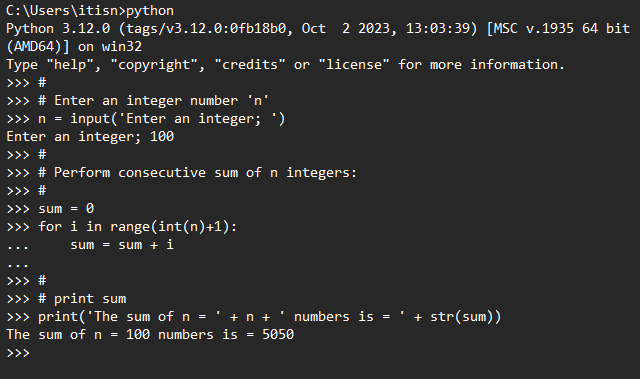
For example, when generating a Python installation guide, ChatGPT usually breaks the process into logical steps and explains why each step matters.
A sample code block might look like this:
print("Hello, World!")
The explanations surrounding the code are often easy for beginners to follow.
Weaknesses
ChatGPT occasionally becomes overly concise.
In some cases:
- Troubleshooting sections are too short
- Advanced edge cases are omitted
- Technical context may be simplified
This isn’t a major problem for beginner tutorials, but experienced developers may want additional detail.
Best Use Cases
ChatGPT works particularly well for:
- Python tutorials
- Windows tutorials
- WordPress guides
- Programming introductions
- Step-by-step technical content
For most bloggers, ChatGPT offers the best balance between technical accuracy and readability.
Claude: Best for Long-Form Explanations
Claude approaches tutorial writing differently.
Instead of focusing on brevity, it tends to provide detailed explanations and additional context.
Strengths
Claude is excellent at:
- Long-form writing
- Detailed reasoning
- Natural language flow
- Educational content
When asked to explain a programming concept, Claude often spends more time teaching the reader instead of simply providing instructions.
For example, while explaining Python environments, Claude may discuss:
- Why virtual environments exist
- Common use cases
- Potential mistakes
- Best practices
This educational approach can improve reader understanding.
Weaknesses
Claude sometimes produces tutorials that are too long.
Common issues include:
- Excessive explanations
- Repetitive wording
- Less concise code examples
For readers who simply want a quick solution, this can feel overwhelming.
Best Use Cases
Claude is particularly strong for:
- Deep technical guides
- Programming concepts
- Educational articles
- Long tutorials
- Documentation-style content
If your audience consists mainly of beginners who need extra explanation, Claude is often a strong choice.
Gemini: Best for Research and Google Ecosystem Topics
Gemini has improved significantly over the past year.
Its biggest advantage is access to Google’s ecosystem and its ability to handle research-oriented tasks effectively.
Strengths
Gemini performs well when:
- Gathering information
- Summarizing topics
- Comparing technologies
- Researching products and services
For example, if you’re writing a guide about Android development or Google Cloud services, Gemini often provides useful context.
Weaknesses
For programming tutorials specifically, Gemini can sometimes struggle with:
- Consistent structure
- Step-by-step organization
- Detailed troubleshooting sections
The generated content may require additional editing before publication.
Best Use Cases
Gemini is useful for:
- Research-heavy articles
- Technology comparisons
- Product reviews
- Google-related technologies
Many bloggers use Gemini during the research phase and another AI tool during the writing phase.
Comparing the Results
| Category | Winner |
|---|---|
| Writing Quality | Claude |
| Structure | ChatGPT |
| Research | Gemini |
Writing Quality
Winner: Claude
Claude generally produces the most natural-sounding prose and detailed explanations.
Tutorial Structure
Winner: ChatGPT
ChatGPT consistently creates clean, organized tutorials with logical progression.
Code Examples
Winner: ChatGPT
In most tests, ChatGPT generated practical code examples with fewer formatting issues.
Research Support
Winner: Gemini
Gemini performs well when gathering information and identifying related topics.
Beginner Friendliness
Winner: Claude
Claude spends more time explaining concepts and reducing confusion for new learners.
Publishing Speed
Winner: ChatGPT
ChatGPT often requires the least editing before publication.
Which AI Is Best for Different Types of Technical Blogs?
For Windows Tutorials
Recommended:
ChatGPT
Its structured format works well for installation guides, troubleshooting articles, and system administration tutorials.
For Python Tutorials
Recommended:
ChatGPT
Python examples are generally accurate and easy to understand.
For Educational Programming Content
Recommended:
Claude
Claude’s detailed explanations help readers understand concepts rather than simply copying code.
For Research-Based Articles
Recommended:
Gemini
Gemini can be useful when gathering background information before drafting the article.
A Practical Workflow for Bloggers
Many successful bloggers don’t rely on a single AI assistant.
Instead, they combine multiple tools.
A common workflow looks like this:
Step 1: Research
Use Gemini to gather background information and identify related topics.
Step 2: Draft
Use ChatGPT to generate the first version of the tutorial.
Step 3: Improve Explanations
Use Claude to expand explanations and clarify difficult concepts.
Step 4: Edit Manually
Review everything yourself.
Check:
- Technical accuracy
- Screenshots
- Formatting
- SEO optimization
Human review remains essential before publishing.
Common Mistakes and Troubleshooting
Publishing AI Content Without Testing
Always verify commands and code examples before publishing.
For example:
python --version
Confirm that commands actually work on a real system.
Ignoring Reader Experience
A tutorial should teach, not just provide answers.
Add screenshots, explanations, and troubleshooting tips whenever possible.
Using Only One AI Tool
Different AI assistants excel at different tasks.
Combining strengths often produces better content than relying on a single platform.
Forgetting to Add Personal Experience
Readers trust tutorials more when they include real-world observations and testing results.
Adding your own screenshots, examples, and notes can significantly improve content quality.
Final Verdict
For most technology bloggers and tutorial writers, ChatGPT currently provides the best overall experience for creating programming tutorials. It offers a strong balance of structure, readability, code quality, and efficiency.
Claude is an excellent option when detailed explanations and educational content are the priority.
Gemini shines during research and topic discovery, especially when covering Google-related technologies.
Rather than asking which AI assistant is universally better, the more useful question is: which assistant fits the specific task you’re working on today?
For many bloggers, the most effective approach is using all three strategically and combining their strengths with human expertise.